Release Branches for Embedded Software
I've been thinking a lot about release branches. Many software companies are not really doing releases anymore with continuous deployment / delivery and SaaS offerings but in the embedded world, firmware is developed and packaged as versioned files that must be rigorously tested with the aim that they will be deployed and perhaps never upgraded or only infrequently upgraded when critical security updates are required.
This means that many companies don't have to worry about release branches. For us embedded developers, the way release branches are managed can have a big impact on the ability to support customers with hotfixes and patch releases as well as timely delivery of feature releases.
The three most talked about git "flow" methods that I can find are GitFlow, GitHub-Flow and GitLab-Flow. Of these, only gitflow and Gitlab-flow are suitable for embedded development. I'll briefly explain github-flow anyway.
What are we trying to achieve?
It's worth taking some time to understand why git branching is important. Collaboration is fundamental to software development and git / scm is at the heart of the collaboration when it comes to code.
Some features these flows try to optimise for:
-
Minimise the time code spends in branches. When code is in branches, it quickly drifts from the main branch as other code is merged in. The longer it stays in a branch, the harder it is to reconcile at merge time.
-
Some form of tagged release. Whether using a release branch or not, all git flows have some point at which the code is released. This is important when it comes to support. The developers supporting the software must know which range of commits are in each release so they know which code a customer is running by knowing the release version.
-
Isolation of releases. While code is being prepared for release, most organisations are also developing the next round of features. The release should happen in parallel and be isolated from changes that result from the features under development.
Different flow styles
GitFlow is the original "flow" method that started the conversation. In 2010, software developer Vincent Driessen blogged about how he uses git branches and in particular how this helps manage releases. He called it GitFlow.
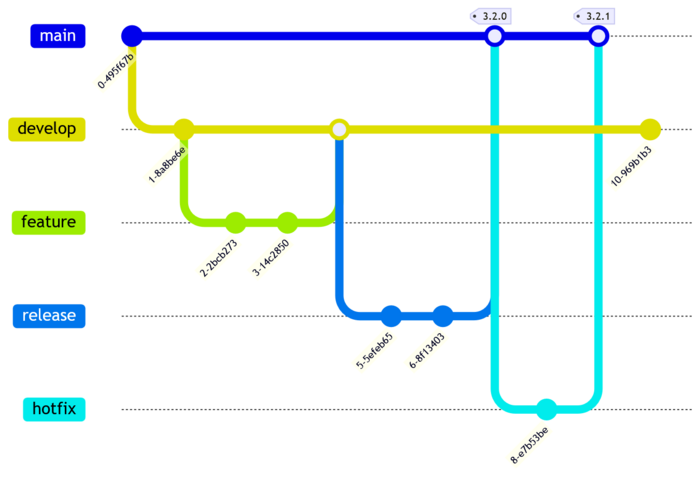
By his own amendment in 2020, GitFlow is not suited to more modern practices such as continuous delivery since it adds overheads such as release processes and hotfixes.
Some other things to note about GitFlow:
-
It mentions decentralised development where developers pull from each others repositories to share code. I have rarely worked that way. In practice most companies use a central server and if there is sharing, it is through branches. This often also results in rewriting of history to hide WIP commits, a practice that git didn't support very well in 2010 but is commonplace now.
-
It assumes you are only supporting the most recent release. The main branch is considered the stable release. If you need to make a hotfix, you branch from head of the main branch which is the most recent release. There are no long lived release branches that let you amend an older release. In embedded software, there are often customers who can't upgrade to the latest release, whether it be due to hardware limitations or integrations with other systems, those customers often need a patch release targeted at their older software.
-
It promotes use of
--no-ffcommits. This can be a contentious topic amongst developers. Many developers advocate for linear git commit history where merges are performed using rebase and fast-forward (--ff-only). This might also be a product of 2010s thinking where rebasing was a more dangerous operation.
GitHub-Flow is maybe the more common flow style in use now. It is suited to continuous delivery. It is simply feature branch -> PR -> main. The main branch is just tagged as a release whenever development has reached some point that the developers are happy with or when a particularly featureful PR has landed.
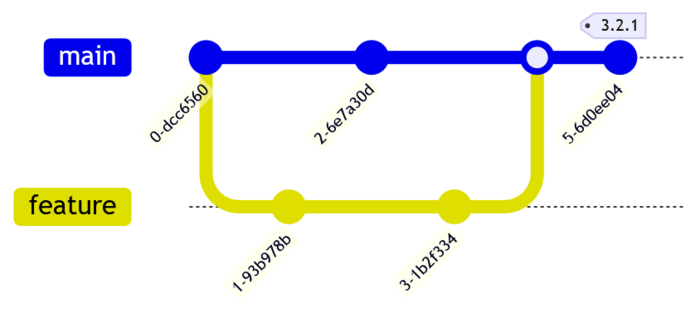
For embedded development, GitHub-Flow lacks some important features:
-
Embedded software releases require rigorous testing that often takes days if not weeks. It is not practical to perform that kind of validation for every PR (unless you have really good automation).
-
There is no way to make hotfixes or patch releases. For reasons discussed above, many customers of embedded software require patch releases.
GitLab-Flow bridges the gap between GitFlow and GitHub-Flow. It is very similar to GitHub-Flow in its most basic form but documents a release branching strategy for versioned software.
In GitLab-Flow, the main branch and feature branches are used with PRs just like in GitHub-Flow. When it comes time for release, a release branch is created from main. As the release branch is tested, any problems found are fixed in main and then cherry-picked to the release branch. Once released, the release branch is tagged. If hotfixes or patch releases are needed, the required fixes are cherry-picked from main to the release branch and tested. Once stable, the release branch is tagged again.
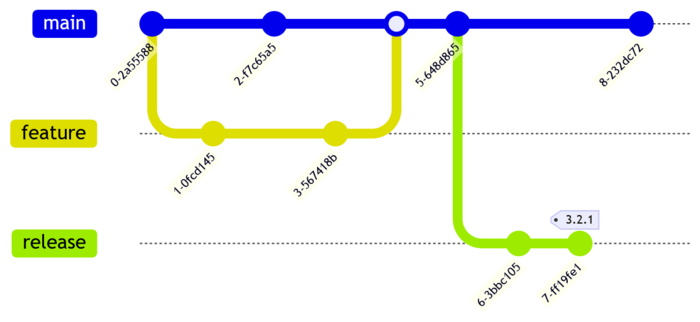
Some features of GitLab-Flow development with release branches:
-
There are fewer branches. The main branch is used more and some continuous integration styles are possible. Developers do feature branches and PRs just as they do for continuously delivered applications.
-
Supports patch releases on multiple released versions in a sane way. It would be a pain if a customer wanted to skip a patch release e.g. they want 3.1.3 but not the previous fix 3.1.2 but that would be very rare and still possible by branching the release branch.
-
There is a lot of cherry-picking.
What is a code freeze?
A long time ago when it was hard to make branches in repositories, organisations would have a code freeze before release. This is where development on new features stops, the main branch is locked and only bugfixes for the release are allowed. The whole team focuses on the release. While this practice is outdated for most software development, it is still used to some extent for embedded projects. A simple reason is where regression testing an embedded product is labour intensive and all developers are required for testing and bugfixing. it might not be worth going through the process of a release branch when there is no other development happening during the release phase.
Should release branches be closed?
GitFlow promotes closing release branches once the release is merged. A stable branch contains the most recently released code at its head. This simplifies matters and makes automating some release processes easier. GitLab-Flow promotes keeping release branches open until the release is no longer supported. For embedded development, it is better to have the option of supporting the older releases so keeping release branches around should be planned for and a strict naming convention should be adhered to. Tooling can be developed to aid managing the branches.
Cherry-picks vs merging
GitFlow promotes merging the release branch to the development branch. In that scenario, fixes during release testing go onto the release branch directly and future regressions are prevented by merging the release branch back to develop when done.
GitLab-Flow promotes fixing all bugs in the main branch and cherry-picking from the main branch to the release branch so that the main branch never misses out on the bugfix. Cherry-picks are more risky than branch merges because they rely on knowing which commits have the desired fixes. Sometimes developers make mistakes and don't label things properly or they sneak a bugfix into a different commit or even accidentally fix a bug in one commit but they think it was resolved by another. There can be dependencies between commits that require conflict resolution. Often the original developer must be consulted to resolve those issues. Releases can be hectic which puts pressure on developers and can lead to mistakes.
Despite that, in some cases, cherry-picks are the better trade-off, especially when a linear git history is prioritised. For example, merges involving submodules and multiple repositories can be just as error prone.
Multiple Repositories and Submodules
Many organisations maintain multiple repositories and submodules to share code between different products. This poses a few problems when it comes to releases.
The first question is whether to lock releases in the repositories all together. This would mean that release branches are created in all the repositories and the references are to the heads of those release branches. The advantage of this is the multiple repositories don't all need their own release life-cycles. If this approach is used, then take care to make the naming scheme product specific, otherwise different products releasing using the same shared repository will have name clashes and confusion will reign.
If the repository releases are decoupled, then they should be in a state where they are either very stable or they are treated like a kind-of in house vendor library. Releases of these repositories will need to be coordinated in response to the needs of the various products that reference them. The disadvantage of this approach is that if a bugfix is needed in the repository, then the product release is delayed until the internal release of the repository can be made (it might be very quick if it supports continuous delivery).
Branching of repositories that reference other repositories is complicated. For example, when the upper repository is branched, it still refers to the main branch of the submodule. The submodule must also be branched for bug fixes and the reference in the upper repository updated. This second step is often forgotten so it is recommended to create automated processes to ensure it is done.
If you choose to avoid cherry-picks and instead decide to merge the release
branch back into main, then submodules also cause issues. Imagine you have made
several fixes in the submodule and updated the upper repository several times.
Now you want to merge back to main. If you are using --no-ff, it's not so bad.
The submodule should be merged first and the when merging the upper repository,
git will find the merge commit and update the reference. When using rebase and
fast-forward, it's not so easy. As soon as you rebase the submodule, you change
history. This breaks the upper module references to the submodule. You need to
find the upper repository reference updates and reconcile them with the new
history. In most cases it's easier to rewrite the upper repository references
updates so they all but the last one is removed. This rewriting of history is
error prone but some developers believe it is worth it to preserve a linear main
branch.
A little plug for Mermaid
Mermaid is a diagramming tool that supports documentation as code. The diagrams are mostly human readable code that can be committed to git alongside README.md files. It happens to support Git diagrams which is really cool and how I made the diagrams for this blog post.
GitFlow mermaid:
gitGraph
    commit
    branch develop
    checkout develop
    commit
    branch feature
    checkout feature
    commit
    commit
    checkout develop
    merge feature
    branch release
    checkout release
    commit
    commit
    checkout main
    merge release tag: "3.2.0"
    branch hotfix
    checkout hotfix
    commit
    checkout main
    merge hotfix tag: "3.2.1"
    checkout develop
    commit
GitHub-Flow with release tag mermaid:
gitGraph
    commit
    branch feature
    checkout feature
    commit
    checkout main
    commit
    checkout feature
    commit
    checkout main
    merge feature
    commit tag: "3.2.1"
GitLab-Flow with release branch mermaid:
gitGraph
    commit
    branch feature
    checkout feature
    commit
    checkout main
    commit
    checkout feature
    commit
    checkout main
    merge feature
    commit
    branch release
    checkout release
    commit
    commit tag: "3.2.1"
    checkout main
    commit
Further Reading
Mastering GitHub Release Branches & Versioning: A Complete Guide