My Minecraft Mod: Kiosk Block
Previously I wrote about Getting Started with Minecraft Modding; this is a continuation of that topic.
In learning to mod Minecraft, an early idea I had was to have a set of special worker villagers that gather resources for me and bring them to a central warehouse. Rather than just have them deposit into random chests, I wanted to add a sense of collaboration between the villagers. Still, I needed some central point that the workers would use for exchanging resources. The kiosk block is my way to do it. Workers deposit items that they want to store in the kiosk. They also communicate a list of resources they need such as pickaxes. A kiosk worker is in charge of the warehouse and fetches the required items as needed while storing the things dropped off at the kiosk.
The kiosk is basically a custom chest: it behaves exactly like a chest but has a custom texture and an ID within the game so the workers treat it as the kiosk and not just any other chest (while it's just a chest, it's semantically different).
Background
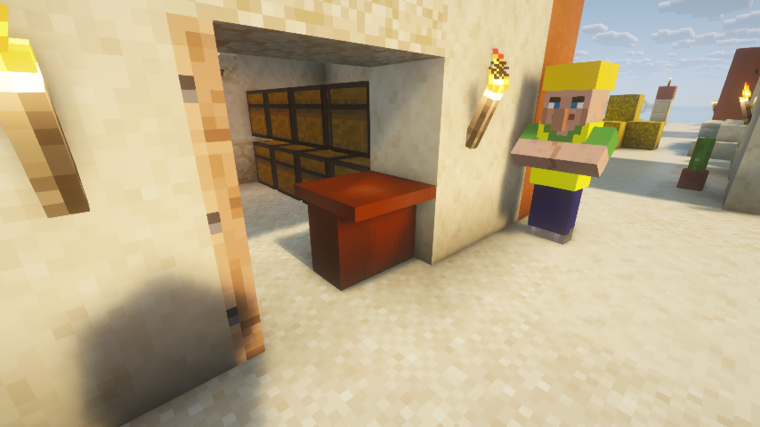
Blocks in Minecraft are all descendants of the BlockBehavior class. The KioskBlock extends the BaseEntityBlock which adds the ability for the block to store state per instance via BlockEntity. The basic block classes set up shared properties for all blocks of the given type.
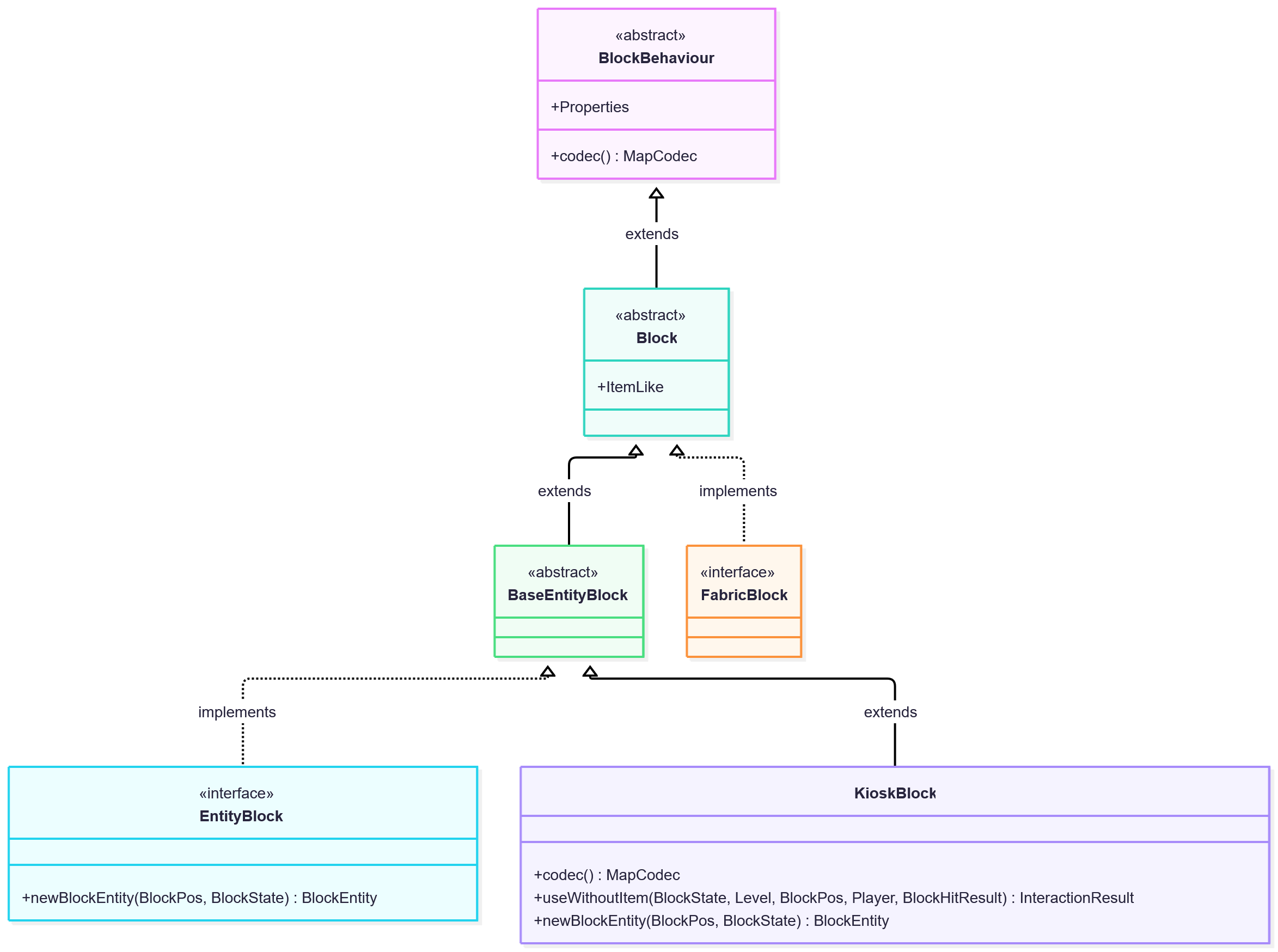
Block entities are state stored on blocks per position / instance. In the case of the kiosk (and chests), the items stored in the kiosk must be managed by a descendant of BlockEntity. The BaseContainerBlockEntity is what chests are descended from so KioskBlockEntity extends that in order to get the chest-like menus and behaviour.
The Mod Base Class
The base class of the mod should be set up by the template or mod generator. I think I renamed mine from ExampleMod. It needs to have an id() method that is used to create the custom block for the mod.
You should see it implements ModInitializer, sets a MOD_ID string and declares the id() function.
The fabric.mod.json declares the entrypoints object that may need renaming to match your main mod class.
The Kiosk Block
The Fabric Documentation explains how to create a custom block. The first article is Creating Your First Block.
The basic steps are:
- Create a class to keep the mod item ids
- Create a class that registers the mod block
- Call the block initializers from the main mod class
onInitialize()method. - Set BlockBehaviour.Properties with strength, sound type, etc.
- Add the block to the creative tab
- Add a translation
- Customise the model and texture
- Add a state definition
- Add block drops
- Set harvesting tool
- Set mining levels
The tutorial doesn't go into much depth on the properties since it's a big topic. Here's what I set:
BlockBehaviour.Properties.of()
    .strength(5.0f, 6.0f)
    .noOcclusion()
    .setId(ModBlockItemIds.KIOSK.block())
The strength makes it so I don't accidentally one-shot break the kiosk. The noOcclusion thing is to prevent certain sides of the kiosk from becoming transparent since I made it a weird shape. The mod crashed without the setId() call.
For the model and texture I used Blockbench. There are tutorials on YouTube etc that will teach you to use it. When done, click "File -> Export -> Export Block/Item Model" to get the model.json file. Also, for the texture, right click on the texture file and do a "Save As" to get a PNG file.
I didn't add a harvesting tool or set mining levels.
The Fabric documentation has pages going into more details about the Block Models and Block States. For the Kiosk block, I didn't need anything special so it's all default. I did put a few things into the Block Entity though.
Block Entity
The Fabric Tutorial for Block Entities explains how to extend BlockEntity. For the kiosk, I extended BaseContainerBlockEntity because the kiosk is basically a chest. I didn't use RandomizableContainerBlockEntity which is what chests actually extend because I don't need the random loot - kiosks don't randomly spawn with items in them.
The documentation includes an example of making the block entity count clicks. The kiosk block has different functionality.
First I set the chest size to 27 and implemented the mandatory overrides:
public class KioskBlockEntity extends BaseContainerBlockEntity {
    private static final int SIZE = 27;
    private NonNullList<ItemStack> items = NonNullList.withSize(SIZE, ItemStack.EMPTY);

    @Override
    public int getContainerSize() {
        return SIZE;
    }

    @Override
    protected NonNullList<ItemStack> getItems() {
        return this.items;
    }

    @Override
    protected void setItems(NonNullList<ItemStack> items) {
        this.items = items;
    }

    @Override
    protected AbstractContainerMenu createMenu(int containerId, Inventory inventory) {
        // threeRows is hardcoded to SIZE slots; changing SIZE requires a different ChestMenu factory or a custom menu.
        return ChestMenu.threeRows(containerId, inventory, this);
    }
}
There's also a name translation for the chest menu:
    private static final Component DEFAULT_NAME = Component.translatable("container.supplychain.kiosk");

    @Override
    protected Component getDefaultName() {
        return DEFAULT_NAME;
    }
And in src/main/resources/assets/supplychain/lang/en_us.json, I added the translation entry under the existing block name translation (that is added when creating the block):
{
    "block.supplychain.kiosk": "Kiosk",
    "container.supplychain.kiosk": "Kiosk"
}
The kiosk also manages the "warehouse" stock. When a special kiosk worker adds and removes items from the kiosk, it updates the stock ledger as well. The stock levels are used by other workers to trigger when to get more resources or craft more items.
It's pretty standard java:
    private final Map<Item, Integer> stock = new HashMap<>();

    public int getStockCount(Item item) {
        return this.stock.getOrDefault(item, 0);
    }

    public void incrementStock(Item item, int amount) {
        if (amount <= 0) return;
        this.stock.merge(item, amount, Integer::sum);
        setChanged();
    }

    public void decrementStock(Item item, int amount) {
        if (amount <= 0) return;
        int current = this.stock.getOrDefault(item, 0);
        int next = Math.max(0, current - amount);
        if (next == 0) {
            this.stock.remove(item);
        } else {
            this.stock.put(item, next);
        }
        setChanged();
    }

    public void resetStock() {
        this.stock.clear();
        setChanged();
    }

    public Map<Item, Integer> getStockSnapshot() {
        return Collections.unmodifiableMap(this.stock);
    }
While the focus of the tutorial is the BlockEntity class, there is some interaction with the BaseEntityBlock subclass when it comes to block interaction. I implemented something similar to the tutorial, partly for logging the stock but it was required for doing the chest interaction:
    // In class KioskBlock (not KioskBlockEntity):
    @Override
    protected InteractionResult useWithoutItem(BlockState state, Level level, BlockPos pos, Player player, BlockHitResult hitResult) {
        if (!level.isClientSide() && level.getBlockEntity(pos) instanceof KioskBlockEntity kioskBlockEntity) {
            SupplyChain.LOGGER.info("[Kiosk@{}] stock: {}", pos, kioskBlockEntity.getStockSnapshot());
            player.openMenu(kioskBlockEntity);
        }
        return InteractionResult.SUCCESS;
    }
There are a couple of tutorials about customising chest-like blocks on the Fabric website: Block Containers and Container Menus.
There are a few other convenience things in the class that I won't mention yet.
In the "Saving and Loading Data" side of things, I save the stock:
    private static final Codec<Map<Item, Integer>> STOCK_CODEC =
        Codec.unboundedMap(BuiltInRegistries.ITEM.byNameCodec(), Codec.INT);

    @Override
    protected void loadAdditional(ValueInput input) {
        super.loadAdditional(input);
        this.items = NonNullList.withSize(this.getContainerSize(), ItemStack.EMPTY);
        ContainerHelper.loadAllItems(input, this.items);
        this.stock.clear();
        input.read("Stock", STOCK_CODEC).ifPresent(map -> this.stock.putAll(map));
    }

    @Override
    protected void saveAdditional(ValueOutput output) {
        super.saveAdditional(output);
        ContainerHelper.saveAllItems(output, this.items);
        output.store("Stock", STOCK_CODEC, this.stock);
    }
The Codec is generally the way the game serialises and deserialises data. There are standard simple codecs like Codec.INT which will handle an integer number. The BuiltInRegistries.ITEM.byNameCodec() function returns the codec that will convert an "Item" to a string that is unique e.g. "minecraft:oak_log" and vice versa. It is a function instead of a static lookup because some items are registered dynamically e.g. the kiosk block itself. The unboundedMap combines the other two codecs to read and write a map that has the item as a key and integer as the value.
For data synching, the chest base class does the work so I didn't need to implement anything. For the stock, I did add calls to setChanged() but since the kiosk doesn't send the stock to the client, there was no need for getUpdatePacket().
Likewise, I didn't add any tickers.
So that wraps it for the Kiosk block. This allowed my workers (not yet explained in this series) to exchange items and store things in a warehouse.